Table of Contents
Every HubSpot portal has the same gap. The fields that would make segmentation, routing and forecasting work are the fields nobody fills in. Industry is blank. Company type is "Other." The pain point a prospect described on a long discovery call lives in a recording nobody will ever play again.
The HubSpot Data Agent is built for that gap. It answers questions about your records and fills in properties using web research, company websites, your existing property data and call transcripts. It's good at classification and summary work. It gets things wrong when the records it reads are messy, when the prompt asks for judgment you never defined, or when the source it needs doesn't exist. And because it charges credits per record, a sloppy first run costs real money.
What Is the HubSpot Data Agent?
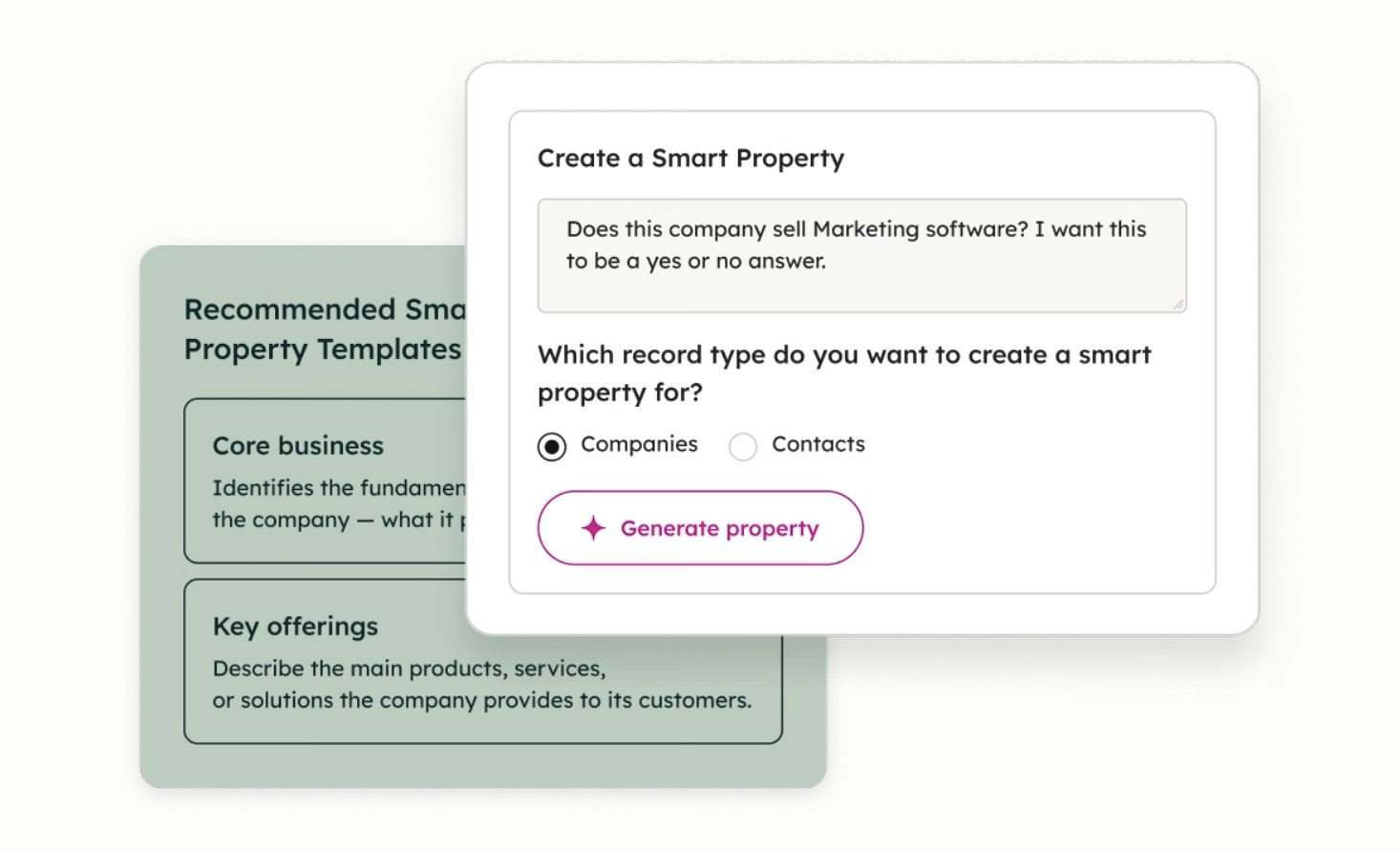
HubSpot's AI page describes the Data Agent as a way to get customer insights from your CRM, calls and documents. HubSpot's Data Agent documentation is more specific. It says the agent is used to answer questions, transform data and enhance workflows, and it works in three places:
- Smart properties: custom properties that fill themselves with AI-generated answers
- Smart actions: AI steps you add inside a workflow
- Smart columns: AI-generated columns in Data Studio
Most teams meet it through smart properties, because that's where the empty fields are.
It's available in Starter, Professional and Enterprise for Marketing, Sales, Service, Data and Content Hub, and it needs HubSpot Credits.
Where Does the Data Agent Get Its Answers?
This is the part to understand before anything else, because every good and bad answer traces back to it. When you build a smart property, HubSpot's documentation lists four data sources to choose from:
- Web research
- The company's website
- Property data already in the record
- Call transcripts
Notice what that means. The Data Agent doesn't know anything you haven't recorded or that the internet can't tell it. If a company's website is vague, the answer will be vague. If your reps don't record calls, the call transcript option has nothing to read.
What the Data Agent Answers Well
It shines on questions with a clear answer that's written down somewhere. A few illustrations of the kind of jobs that fit:
Classifying companies. Is this company B2B or B2C? Manufacturer or distributor? Which of your five industries does it fall into? A company website usually answers these, and HubSpot's own example uses web research to classify company records.
Summarizing calls. What pain points did this prospect mention? What competitor came up? HubSpot's documentation uses exactly this example: summarizing pain points from call transcripts and emails.
Filling the fields reps skip. Every CRM has a property that would be useful if anyone filled it in. The Data Agent will fill it in on every record, consistently, without reminders in the Monday meeting.
The common thread: the answer exists, it's findable, and you could check it yourself if you had the time.
Where the Data Agent Gets It Wrong
Here's the problem. A wrong answer from the Data Agent doesn't look wrong. It looks exactly like a right answer, sitting neatly in a property, ready to feed a workflow.
Most of the mistakes come from four places.
Duplicate and stale records. If the same company exists three times with three different domains, you'll get answers based on whichever version the agent reads. The agent can't clean up your CRM for you. It works from what's there.
Judgment you never defined. Ask "Is this a good-fit account?" and the agent will answer. But good fit by whose definition? If your team can't write down what makes an account a good fit, the agent is guessing, and guessing confidently. Give it the criteria, or better, give it a fixed list of options to choose from.
Sources that don't exist. No call recordings means nothing to summarize. A two-page website means a thin classification. The agent won't tell you it had nothing to go on unless you design the prompt to say so.
The wrong question for the tool. Some questions need a rule, not AI. If "region" is just a lookup from the state field, a workflow does that for free and never gets it wrong.
The Credit Math Nobody Runs First
HubSpot's documentation says credits are consumed each time the Data Agent generates a response to one prompt for one record. Read that twice. A smart property on your full company database runs once per company.
That's fine when the prompt is good. It hurts when you discover halfway through your database that the prompt was ambiguous and you need to run it again.
Two controls help. When you create a prompt-based smart property, you review a preview before you apply changes, per HubSpot's documentation. And HubSpot's credits documentation lets admins set monthly credit limits per feature, so one experiment can't eat the month's allocation. Neither limit is on by default.
How to Test the Data Agent Before It Touches Your Whole CRM
Here's the approach I'd take, and none of it is complicated.
- Pick one property a decision depends on. Not ten. One field that routing, scoring or segmentation uses, and that's mostly empty today.
- Write the prompt like an instruction to a new hire. Say which source to use, what the options are, and what to answer when the source doesn't say. A fixed set of answers beats free text every time.
- Run it on records you already know. Pick a small set of accounts your team knows well and compare the agent's answers to what your people would have said. If it disagrees with your best rep, find out why before you scale it.
- Then scale, with a cap. Set a feature-level credit limit, roll it out to the rest of the segment, and spot-check a sample every week for the first month.
What Your Buyers Notice
Your buyers will never know the Data Agent exists. They'll notice the results. The lead that gets routed to the rep who knows their industry. The follow-up email that mentions the problem they described on the call. The nurture sequence that doesn't treat a manufacturer like a SaaS startup.
That's the case for it. Not cleaner data for its own sake, but fewer moments where your company sounds like it wasn't listening.
The Data Agent is one of several HubSpot agents. Here's how HubSpot Agent Hub fits together, and if you want help setting the Data Agent up on clean data, see how we set up HubSpot Agent Hub.
Clean the records first. Then let the agent fill them in.
FAQs