Table of Contents
I talk to a lot of RevOps leaders and ops managers who are dealing with the same frustrating reality: their HubSpot and Salesforce integration worked at first. Then, slowly, it didn't.
The error log numbers are out of control. And nobody knows why or when it started.
Here's the thing. It's almost never random. These problems are predictable, and they almost always come back to a handful of root causes we see over and over again.
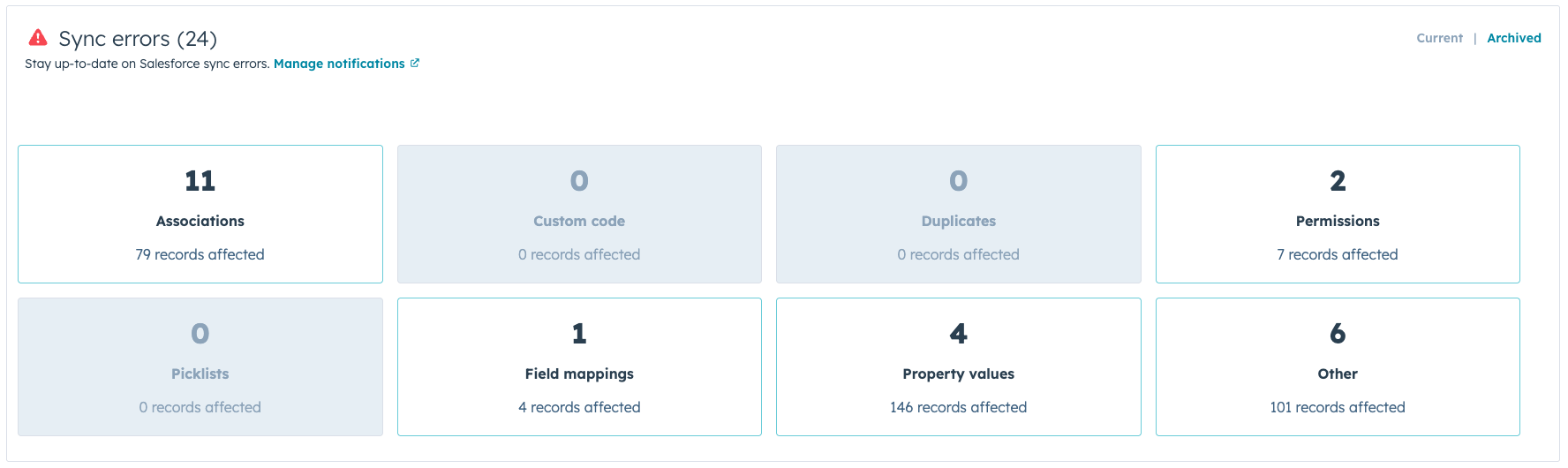
The Setup Looked Fine. The Reality Isn't.
We hear this constantly. A company gets HubSpot and Salesforce connected, everything passes the demo, and a few months later, the sales team is complaining about bad data, and marketing is wondering why their leads aren't showing up.
What usually happened: the integration was built to get through implementation, not to run a real business. There's a big difference between those two things. One checks boxes. The other is actually mapped to how your team works, how your data flows, and how your deals move.
That gap is where most integrations start to fall apart.
The Real Reasons It Breaks
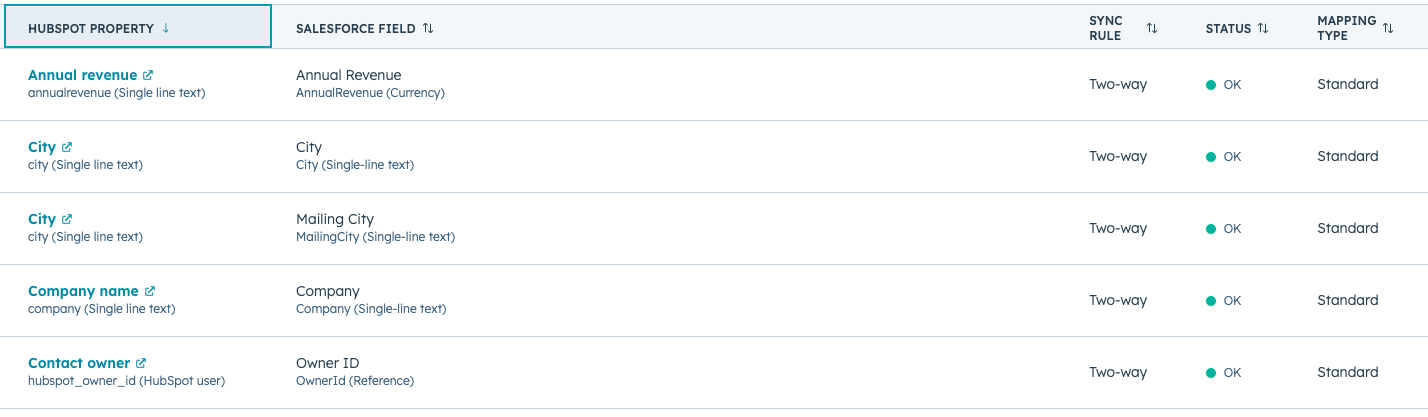
Your field mapping was set up once and never touched again
Field mapping is the foundation. It tells HubSpot and Salesforce what to share and how to translate it between systems. When it's wrong or outdated, nothing downstream works the way it should.
The issue is that most teams set field mapping at implementation and move on. But your business changes. New properties get added. New options are added to dropdowns. Nobody connects the dots, and eventually, critical data just stops flowing.
Field mapping needs an owner. Someone who reviews it when things change, not just when something breaks.
Your sync rules are too broad
Another common mistake we see is syncing everything. It sounds logical. You want your data in one place. But when every contact, lead, and activity syncs in both directions without any conditions attached, you end up with a mess that makes both platforms harder to use.
Good sync rules are specific. They define which records sync, in which direction, and under what conditions. Without that, you're constantly fighting bad data, bloated records, and automations that trigger on the wrong people. HubSpot's documentation on sync settings is a decent starting point, but the real work is mapping those settings to your actual sales process.
Duplicate records are a symptom, not the problem
If you're seeing duplicates, the instinct is to run a cleanup tool and move on. But duplicates are usually a sign of something upstream: sync rules that aren't filtering records correctly, or a lead-creation process that lacks deduplication logic.
Once duplicates compound, your reporting becomes unreliable, your automation misfires, and your sales team stops trusting the data. At that point, it's not just a technical problem. It's an adoption problem, and those are a lot harder to fix.
Platform updates break things quietly
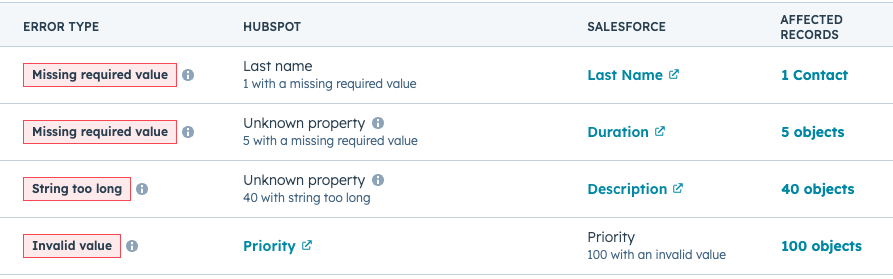
HubSpot and Salesforce both push updates regularly. Most of them don't affect your integration. But some do. API changes, permission updates, new field requirements, deprecated features. Any of these can cause silent sync failures that go undetected until weeks of bad data have already entered your pipeline.
This is why integrations that worked great for a year suddenly stop. Nobody was watching it. An update pushed through, a field stopped syncing, and by the time someone noticed, the damage was already done.
Your workflows weren't built with both platforms in mind
Marketing builds automations in HubSpot. Sales ops builds them in Salesforce. Neither side fully sees what the other has built. And the integration runs right in the middle, with no map for how the two sets of logic interact.
This is where the real horror stories come from. A workflow in HubSpot updates a field that triggers something in Salesforce that syncs back to HubSpot. Now you have a loop nobody planned for. Avoiding this requires visibility across both platforms, whether that's one team owning both or a solid, documented handoff between the teams that do.
The original setup was cookie-cutter
Both HubSpot and Salesforce have native connectors designed to get you connected quickly. They're built for the average business, not yours. Your deal stages aren't average. Your lead scoring logic isn't average. Your lifecycle stages aren't average.
A cookie-cutter setup treats them like they are, and you feel it in the misaligned data, the broken handoffs, and the sales team that doesn't trust anything marketing sends over. The gap between "what it can do out of the box" and "what actually works for your business" is real.
Nobody actually owns it
Honestly, this is the one that underlies almost everything else.
The HubSpot Salesforce integration is infrastructure. It needs an owner. Someone who knows how it's built, monitors it regularly, reviews it when processes change, and takes accountability when something goes wrong.
What usually happens instead: it gets set up during implementation and handed off to no one in particular. Marketing thinks ops owns it. Ops thinks IT does. IT thinks the agency handles it. Nobody's watching.
That's not a technology problem. That's an organizational one.
What "Fixed" Actually Looks Like
A healthy integration doesn't announce itself. You just notice, over time, that things stop breaking.
The sales team stops complaining about bad data. Leads show up where they're supposed to. Your pipeline report in Salesforce matches what's in HubSpot. Handoffs happen cleanly without anyone manually intervening.
That doesn't happen by accident. It's built through a deliberate process: auditing what you have, identifying where the breakdowns occur, rebuilding field mapping and sync rules around your actual processes, and putting monitoring in place so you know when something goes wrong before it snowballs.
The fix isn't always a full rebuild. A lot of the time it's targeted, surgical work. But it has to be done intentionally.
Why Most Fixes Don't Hold
A lot of teams fix their integration, see it improve for a few months, and then end up back in the same place six months later.
The reason is almost always the same: the fix addressed the symptoms but didn't change the structure. Nobody took ownership. Field mapping still has no review process. Workflows are still being built without cross-platform visibility. Updates still go unmonitored.
A stable integration needs governance, not just configuration. It needs someone to treat it like the operational backbone it actually is.
How We Approach It at ATAK
We don't show up with a template. We start by understanding how your business actually works. Your sales process, your lead lifecycle, your team structure, your existing workflows. Then we build your integration around that reality.
That means custom field mapping, sync rules with real conditions, workflow audits across both platforms, and monitoring so nobody's flying blind. We document everything and make sure ownership is clear on your end before we step back.
The goal is to build something that holds up as your team grows and both platforms continue to evolve.
If your HubSpot Salesforce integration is breaking, we can tell you exactly why and exactly what it'll take to fix it.
Book a Discovery Call and let's take a look.
FAQs