Table of Contents
If your sales team is tired of chasing leads that go nowhere, the problem probably isn’t your pipeline. It’s how you’re deciding who’s actually ready to buy.
Traditional lead scoring can be manual and opinion-based if not done well. A contact downloads an eBook and gets 10 points. They book a demo and get 50. But nobody agreed on what “ready to buy” actually looks like, so the number is meaningless. And if done well, it can be a massive time drain to create and maintain.
AI lead scoring in HubSpot changes that. Instead of assigning points based on gut feeling, it learns from what your actual closed-won deals have in common and works backward to rank everyone else in your pipeline.
Here’s what that looks like in practice, and what ATAK has seen work versus what still gets oversold.
What AI Lead Scoring in HubSpot Actually Does
HubSpot’s AI-driven lead scoring uses machine learning to analyze your existing contact and deal data. It looks at firmographic data, behavioral signals, email engagement, website activity, and CRM history. Then it outputs a score from 0 to 100 that reflects the likelihood of a contact converting to a customer.
The key difference from manual scoring: you don’t define the criteria. HubSpot does, based on your own historical patterns.
But here’s what most teams miss: predictive scoring is only as good as the data behind it. If your CRM is full of junk contacts, incomplete records, or contacts that were never properly lifecycle-staged, the model trains on noise.
The Setup That Actually Makes It Work
1. Clean your contact data first.
Before you even think about enabling predictive scoring, your HubSpot instance needs clean, complete data. That means consistent lifecycle stage assignments, accurate company and industry fields, and contact records that reflect real engagement rather than mass-imported lists from three years ago.
At ATAK, before we configure AI scoring for any client, we run a data audit. Nine times out of ten, we find contacts sitting in “Subscriber” who should be “Marketing Qualified Lead” or deals with no associated contacts at all. That kind of data chaos makes predictive scoring unreliable.
2. Define what “converted” means in your HubSpot.
Predictive scoring learns from your closed-won data. If you haven’t been consistently marking deals as closed-won in HubSpot, or if you’re closing deals in Salesforce but not syncing the outcome back to HubSpot, the model is training on an incomplete picture.
If you’re running a HubSpot and Salesforce integration, this is especially critical. The data sync needs to be bidirectional and accurate, so that when a deal closes in Salesforce, HubSpot knows about it and can factor that into the model. Learn more about how to get that sync right at HubSpot’s Marketing Blog.
3. Don’t abandon lifecycle stages.
One mistake we see often: teams turn on AI scoring and then stop managing lifecycle stages because they figure the score will handle everything. It won’t. Lifecycle stages still drive your automation, your reporting, and your segmentation. The AI score adds a layer of intelligence on top. It doesn’t replace the foundation.
What the Score Should Trigger
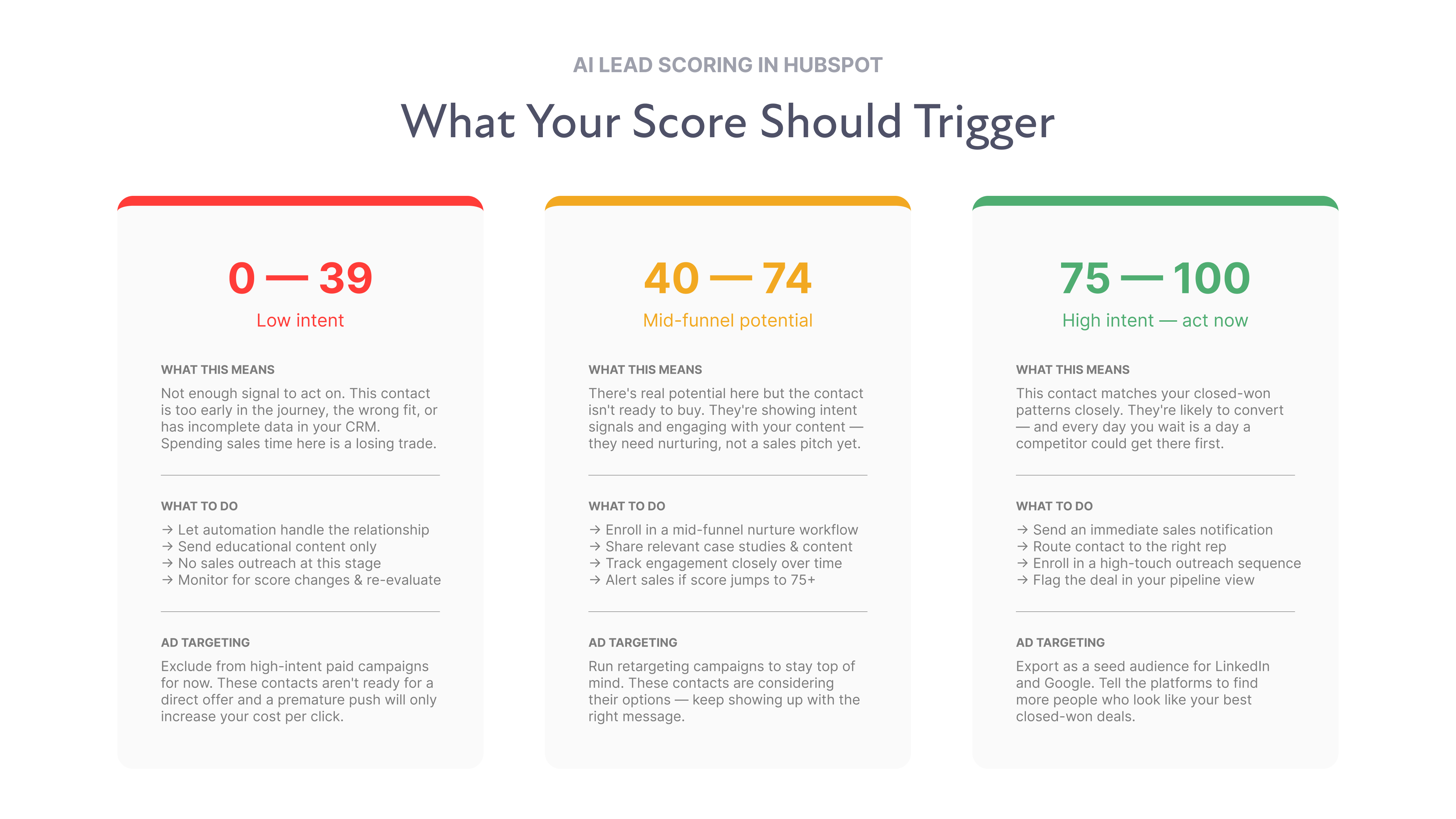
Once your predictive scores are running, the question is: what do you do with them? Here’s a simple framework that works:
- Score 75+: Immediate sales notification. Route to the appropriate rep, enroll in a high-touch sequence, and flag in your pipeline view.
- Score 40-74: Enroll in a mid-funnel nurture workflow. These contacts have potential, but aren’t ready. Keep them warm with relevant content and continue tracking engagement.
- Score below 40: Don’t ignore them, but don’t spend sales time on them. Let automation handle the relationship until behavior changes.
The score should also inform your ad targeting. If you export your high-scoring contacts and use them as a seed audience for LinkedIn or Google campaigns, you’re essentially telling those platforms, “find more people who look like our best prospects.” That feedback loop between HubSpot scoring and paid media is one of the highest-leverage moves a B2B marketing team can make. For more on paid and organic synergy, Semrush’s blog has solid resources on audience-based campaign strategy.
Where AI Lead Scoring Falls Short
Let’s be direct about the limitations, because there are real ones.
It takes time to build accuracy. HubSpot recommends having at least 200-300 closed contacts (both won and lost) before predictive scoring becomes reliable. If you’re an earlier-stage company or have a smaller contact database, the model won’t have enough signal to make good predictions. Manual or rule-based scoring may be more appropriate until you hit that threshold.
It doesn’t account for intent signals outside HubSpot. If a contact reads five competitor comparison pages on G2, your HubSpot score won’t reflect that unless you’ve integrated G2 intent data or a similar tool. AI scoring in HubSpot is powerful, but it’s still limited to the behavioral data within the platform’s reach.
It can develop bias. If your historical wins are concentrated in one industry or company size, the model will over-index on those patterns. Regularly audit your scores against the deals you’re actually closing. If you’re winning new verticals, but the model hasn’t caught up, you’ll lose leads you should be pursuing.
The Bigger Point
AI lead scoring isn’t a magic button. It’s a tool that makes your existing data smarter. If your data is clean, your lifecycle stages are accurate, and your CRM reflects your real sales motion, predictive scoring gives your team a genuine edge. It removes the subjectivity from the MQL-to-SQL handoff and gives sales and marketing a shared, objective signal to align around.
If your data is a mess, it will just be a number nobody trusts sitting on every contact record.
The companies that get the most out of AI lead scoring are the ones that invested in their CRM foundation first. That’s not the exciting part of RevOps. It rarely is. But it’s the part that determines whether the technology delivers or disappoints.
If you’re not sure where your HubSpot instance stands, that’s exactly what we help figure out.
FAQs