Table of Contents
Most HubSpot portals contain at least one "monster" workflow that no one dares to touch. It has been running for years, spans dozens of actions, and includes complex branching logic that no one fully understands anymore. This is a mega-workflow, and it is a liability disguised as a solution.
The better alternative is chained workflows. By breaking sprawling automations into modular, single-purpose segments, you create a system that is easier to troubleshoot, maintain, and scale.
What a Mega-Workflow Actually Costs You
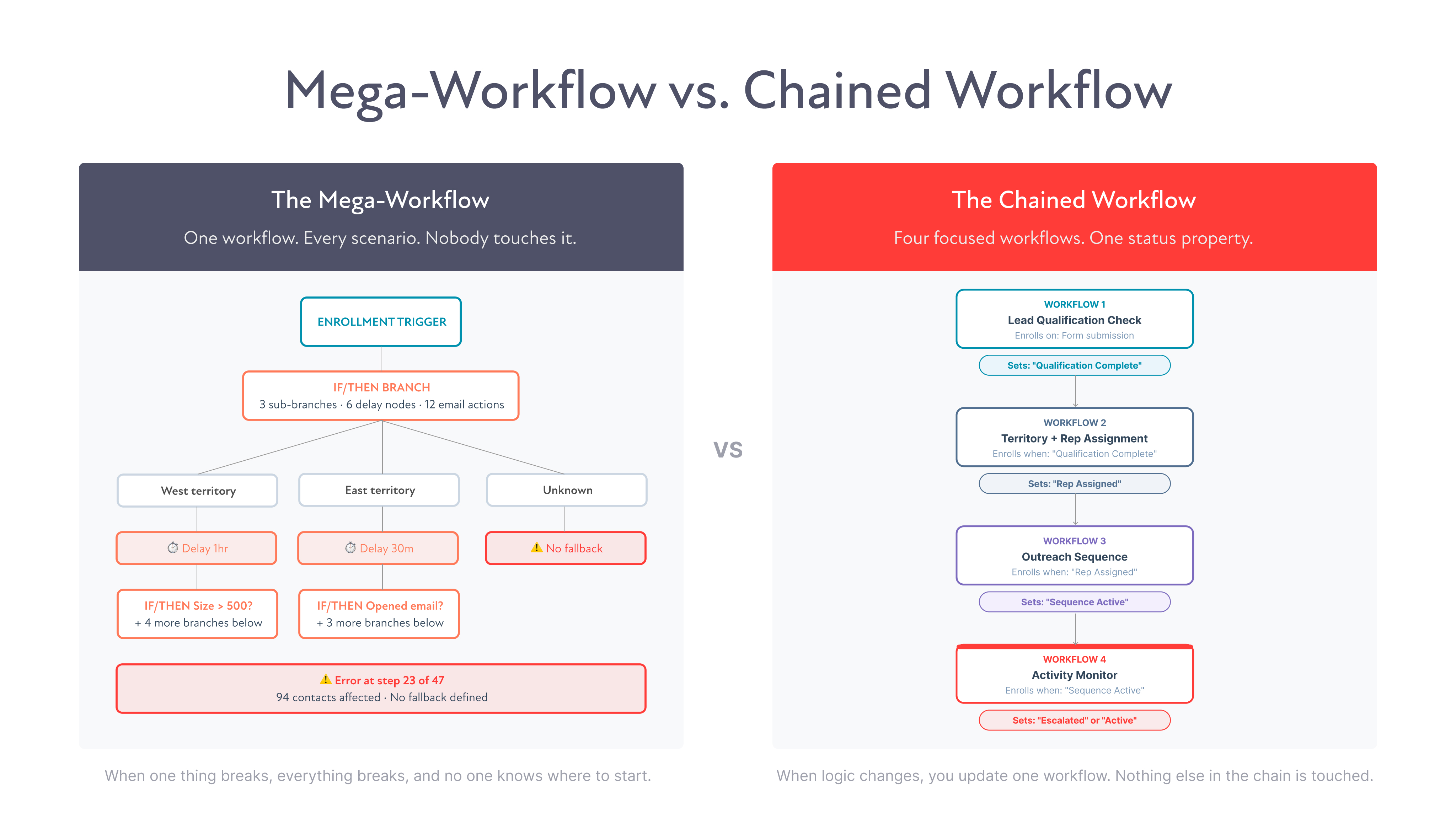
A mega-workflow attempts to consolidate every scenario into one logic tree. While it might "work," it creates several critical points of failure:
- Troubleshooting becomes archaeology: When an error occurs, finding the root cause requires tracing through endless branches.
- Performance lag: HubSpot processes actions sequentially; massive workflows can cause delays that compound at scale.
- Knowledge silos: If the original creator leaves, the system becomes a "black box" that new team members are afraid to edit.
How Chained Workflows Work
Chaining breaks your automation into discrete phases that hand off to one another using a custom status property. This property acts as the connective tissue for your entire system.
Here’s the core pattern:
- Workflow 1 handles enrollment and initial routing. When it’s done with its job, it updates a custom status property on the contact record. Something like “Automation Stage = Qualified Routing Complete.”
- Workflow 2 is enrolled by that property change. It picks up exactly where Workflow 1 left off, runs its specific set of actions, and then updates the status property again when it’s finished.
- Workflow 3 enrolls based on the next property value. And so on.
Each workflow has one job. Each handoff is controlled and documented. The status property on the contact record tells you exactly where in the automation chain that contact currently sits, at a glance, without opening a single workflow.
The Status Property: The Key to Making It Work
The status property is what separates a well-built chained workflow system from a collection of disconnected automations.
Create a single custom contact property, something like “Workflow Stage” or “Automation Status,” with a defined set of dropdown values that map to each stage in your chain. Every workflow in the chain both reads from and writes to this property.
This gives you three things that mega-workflows can never give you:
- Visibility. Pull a contact record, and you can see exactly where they are in your automation system without opening a single workflow.
- Control. If a contact gets stuck or needs to be moved manually, you update one property value. The right workflow picks them up from the correct point.
- Reporting. Build a simple contact report filtered by workflow stage, and you have a real-time view of how many contacts are at each stage of your automation. That’s a pipeline view for your marketing operations.
A Real-World Example: Lead Routing at Scale
Here’s how this plays out in practice. Say you’re running a lead routing system that needs to handle inbound leads, assign them to the right rep based on territory and company size, send a personalized sequence, and notify the sales manager if no activity happens within 48 hours.
The mega-workflow approach puts all of that in one place. Enrollment trigger fires, branches split by territory, branches split again by company size, emails send, delays stack, notification logic runs. By the time you’re done, you have a workflow that takes 20 minutes to trace from top to bottom.
The chained workflow approach looks like this:
- Workflow 1: Lead Qualification Check. Enrolls on form submission. Checks required fields. Sets Workflow Stage = “Qualification Complete” if the record passes, or routes to a data cleanup workflow if it doesn’t.
- Workflow 2: Territory and Rep Assignment. Enrolls when Workflow Stage = “Qualification Complete.” Runs branch logic to assign owner based on territory and company size. Sets Workflow Stage = “Rep Assigned.”
- Workflow 3: Outreach Sequence. Enrolls when Workflow Stage = “Rep Assigned.” Sends the appropriate personalized sequence for that rep’s territory. Sets Workflow Stage = “Sequence Active.”
- Workflow 4: Activity Monitor. Enrolls when Workflow Stage = “Sequence Active.” Waits 48 hours. Checks for logged activity. Sends manager notification if none exists. Sets Workflow Stage = “Escalated” or “Active.”
Each workflow is clean, readable, and independently editable. If the territory assignment logic changes, you update Workflow 2 and only Workflow 2. Nothing else in the chain is touched.
When to Use Chained Workflows vs. a Single Workflow
Not every automation needs to be chained. A simple welcome email sequence with three steps and no branching logic doesn’t need four workflows and a status property. That’s over-engineering a simple task.
Chained workflows earn their complexity when:
- Your automation has more than two distinct logical phases
- Multiple teams or roles need visibility into where contacts are in the process
- You expect the logic to change over time and want to edit without risk
- You’re running automation at a volume where performance and troubleshooting time actually matters
- You need to report on contacts by automation stage
If you can draw your automation on a whiteboard and it fits on one page with room to spare, a single workflow is probably fine. If it takes two pages and a legend, chain it.
Build Workflows You Can Actually Maintain
The best automation isn’t the most clever automation. It’s the automation your whole team can understand, update, and trust six months from now.
Chained workflows with a status property give you that. They turn complex routing logic into a system that’s transparent, editable, and built to scale without turning into a black box.
At ATAK, this is one of the first things we look at when we audit a HubSpot portal. How the workflows are structured tells us almost everything about how the system has been maintained and what it’s going to take to improve it.
Build for the team that inherits it. They’ll thank you for it.
Ready to audit your workflow architecture? Let’s talk.
FAQs