Table of Contents
Here's something we tell every client who comes to us with a CRM migration on the horizon: the technology is the easy part. The data is where migrations actually succeed or fail.
Most teams underestimate how much work lives in the data layer. They're focused on the new platform, the new workflows, the fresh start. And then they migrate, and suddenly every problem that existed in their old CRM is right there in the new one. Just with a different logo on the login screen.
AI has genuinely changed what's possible in migration prep. What used to take weeks of manual cleanup can now be done faster and with fewer errors. It can be more affordable than bulk deduplication and cleaning tools, and even more customizable. But only if you understand what AI is actually good at, and where you still need human judgment in the loop.
Why Dirty Data Before a Migration Is a Compounding Problem
Bad data doesn't stay contained. It spreads.
One duplicate contact becomes two pipeline records. Two pipeline records create inconsistent reporting. Inconsistent reporting means your sales team doesn't trust the data. And a team that doesn't trust the data stops using the CRM.
We've seen it happen. A company invests in a full HubSpot migration, spends months on implementation, and within a quarter, the sales team is back to managing deals in spreadsheets because nothing in HubSpot matches what they know to be true.
The migration didn't fail because of HubSpot. It failed because dirty data came with it.
The time to fix your data is before you move it. Not after.
What AI Does Well in Migration Prep
This is where it gets genuinely useful. AI tools have gotten good at the repetitive, pattern-recognition-heavy work that used to require hours of manual effort. Here's where they make the biggest impact.
Deduplication
Duplicate records are one of the most common migration problems we see. A contact exists three times because they filled out a form, got imported from a trade show list, and were manually created by a sales rep. Their name is spelled differently in each record.
AI deduplication tools can scan across thousands of records, flag likely matches based on name, email, company, phone number, and behavioral patterns, and surface them for review. What used to take a person days of comparison work now takes minutes.
It still requires human review before merging. AI flags the candidates. You make the call. But the volume of work it removes is significant.
Field Standardization
This one is unglamorous but critical. In most CRMs that have been around for a few years, field values are a mess. Your industry field has "SaaS," "saas," "Software as a Service," and "B2B Software" all referring to the same thing. Your state field has "CA," "California," and "Calif." Your job title field is a free-text disaster.
When you migrate that into HubSpot, it breaks segmentation, ruins automation logic, and makes reporting unreliable from day one.
AI tools can scan field values across your entire database, identify inconsistencies, suggest standardized values, and in many cases normalize them automatically.
Identifying Incomplete or Unusable Records
Not every record is worth migrating. AI can flag contacts with missing email addresses, companies with no associated activity in three years, leads that were never qualified and never will be. Records that are technically in the system but provide zero signal.
Migrating everything feels safe. It's not. Every piece of junk data you bring into HubSpot is something your team has to filter around. Pruning before you move is almost always the right call.
Normalizing Data Formats
Phone numbers in five different formats. Dates stored as text strings. Company names with inconsistent capitalization. These feel like small things until they break an automation or cause a sync error with Salesforce.
AI can scan for format inconsistencies across your entire dataset and normalize them before migration. It's the kind of work that's tedious for humans and fast for machines.
What AI Can't Do Alone
Here's where we try to be honest with clients. AI is a force multiplier in data prep. It's not a replacement for human judgment.
AI doesn't know your business logic. It doesn't know that "Partner" in your contact type field means something different than it does in your deal type field. It doesn't know that a particular company should be merged with another because of an acquisition you closed last year. It doesn't know which duplicate to keep and which to archive when both records have meaningful data attached to them.
Those decisions require someone who understands your sales process, your data model, and how your team actually uses the CRM. AI surfaces the issues. People resolve them.
The teams that use AI most effectively in migration prep treat it as the first pass, not the final word. They run the AI tools, review the output, make judgment calls on the edge cases, and go into the migration with data they've actually looked at.
What Clean Data Looks Like Going Into HubSpot
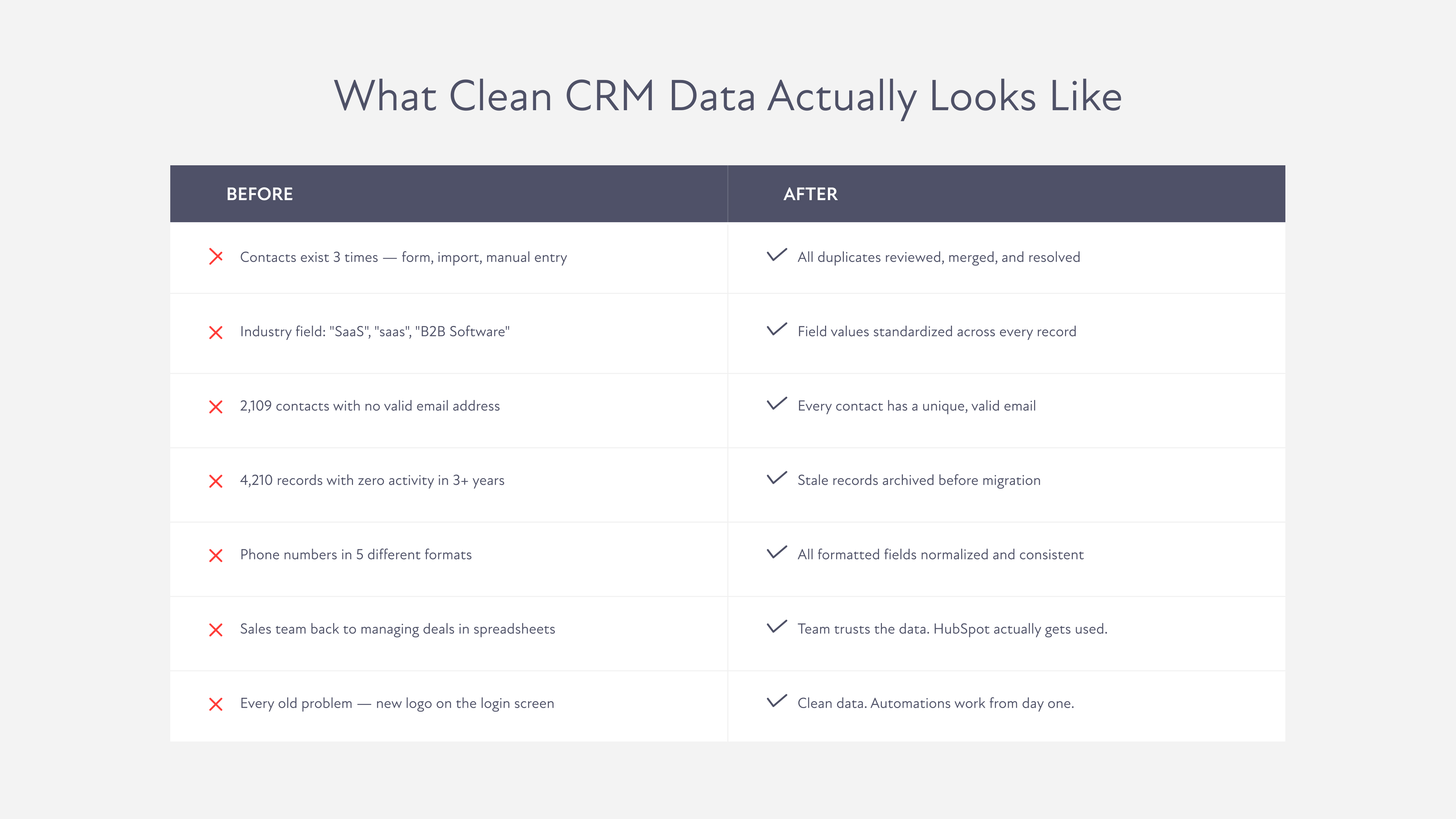
It's worth being concrete about this because "clean data" can feel like a vague goal.
Before migrating into HubSpot, you want to be able to say yes to all of these:
Every contact has a valid, unique email address. Duplicate contacts and companies have been reviewed and resolved. Field values are standardized and consistent across records. Records with no meaningful activity or data have been archived or removed. Phone numbers, dates, and other formatted fields are consistent. Company associations are accurate. Deal stages and lifecycle stages map cleanly to HubSpot's data model.
That's not a perfect system. It's a functional one. And a functional starting point makes everything that comes after, your workflows, your automations, your reporting, work the way it's supposed to from day one.
Book a Discovery Call and let's look at what you're working with.
FAQs