Table of Contents
HubSpot is pushing AI hard. Every hub has new features. Every product update leads with it. And if you’re a revenue leader, you’re probably getting pressure from above to “do something with AI” before your competitors do.
Here’s the problem: most teams that rush into HubSpot AI features don’t get better results. They get faster versions of their existing problems.
AI readiness isn’t about being early. It’s about being ready. And the teams that get real ROI from HubSpot AI tools are the ones who asked the right questions before they ever turned a feature on.
What “AI in HubSpot” Actually Covers
Before you evaluate readiness, you need to know what you’re evaluating. HubSpot’s AI features span every hub, and they’re not all created equal.
Breeze Intelligence (Enrichment): Auto-enriches contact and company records using third-party data. Fills in missing firmographics, job titles, and intent signals without manual research.
AI-Powered Lead Routing: Uses behavioral and firmographic signals to route leads to the right rep automatically, reducing the lag between form fill and first touch.
Content Assistant: Generates email copy, landing page content, blog drafts, and CTAs inside HubSpot based on your prompts and existing context.
Predictive Lead Scoring: An AI model that scores contacts based on historical patterns in your CRM, weighted toward behaviors that have previously led to closed deals.
Conversation Intelligence: Transcribes and analyzes sales calls, flags keywords, tracks objections, and surfaces coaching opportunities for managers.
Breeze Chatbot: Qualifies inbound leads, routes conversations, and books meetings automatically when reps aren’t available.
Each of these solves a different problem. That’s important. Because the question isn’t “should we use AI in HubSpot?” It’s “which AI feature solves the specific problem we actually have?”
The Readiness Question Nobody Asks
Most teams ask: “What can HubSpot AI do for us?”
The right question is: “What does HubSpot AI need from us to work?”
The answer is always the same. Clean data, consistent processes, and actual platform adoption.
AI learns from your CRM. If your deal stages are inconsistently used, predictive scoring learns the wrong patterns. If your contact records are full of duplicates and missing fields, enrichment has nothing clean to build on. If your reps aren’t logging activities, conversation intelligence has no calls to analyze.
This is the most common reason HubSpot AI underperforms. Not a bad feature. Not a configuration issue. A foundation that wasn’t ready.
RevOps strategy has always said this: technology solves for a working process. It doesn’t fix a broken one. AI just makes that truth more expensive when you ignore it.
A Decision Framework for Revenue Leaders
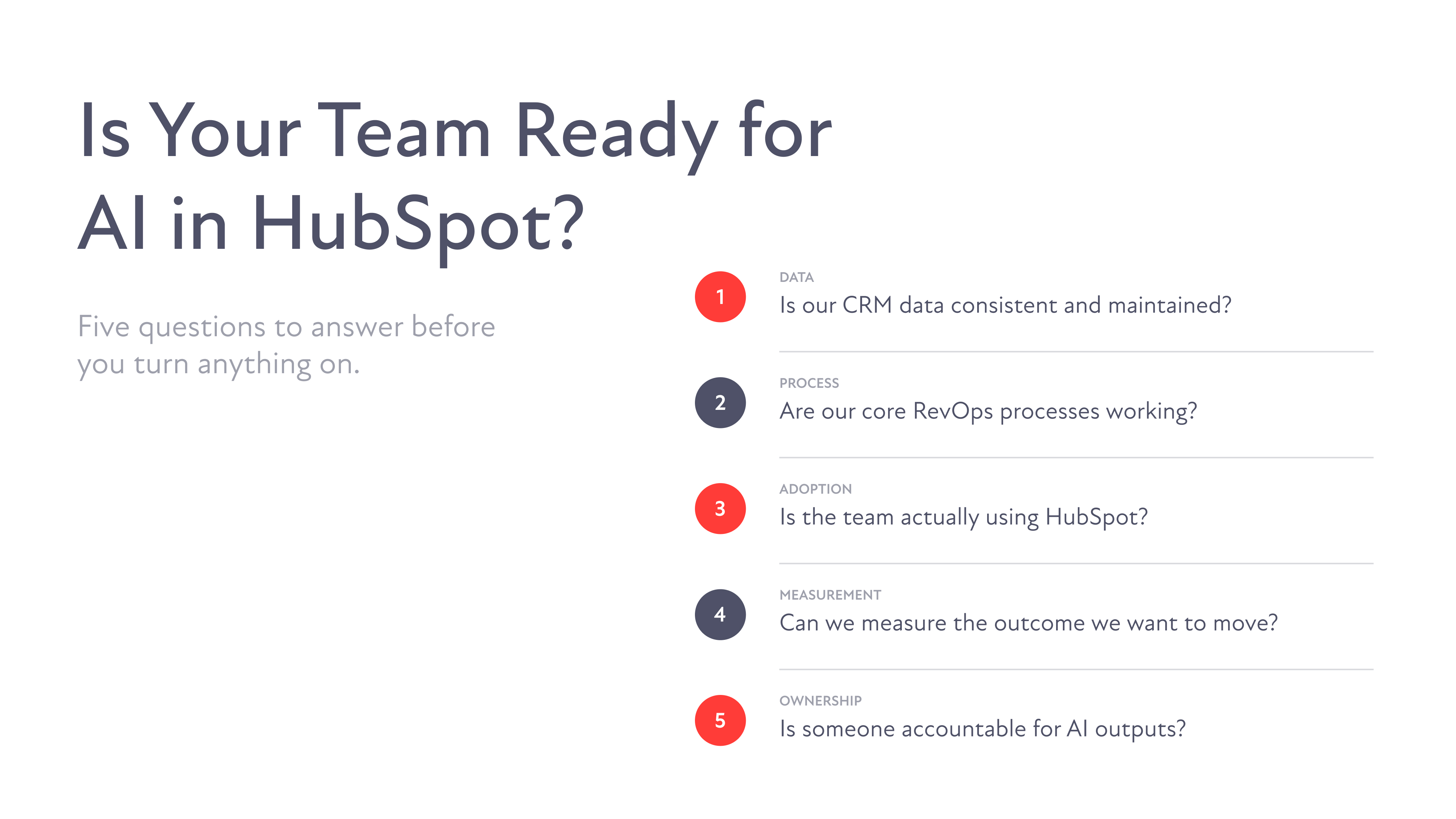
Run through these five questions before enabling any AI feature in HubSpot.
1. Is our CRM data consistent and maintained?
Check contact and deal records. Are lifecycle stages mapped and accurate? Are deal stages moving based on real criteria, or are they static because nobody updates them? Are key fields like industry, company size, and lead source filled in reliably?
If your team can’t agree on what a qualified lead looks like in HubSpot, AI can’t either.
2. Are our core RevOps processes actually working?
AI should optimize a functioning process. If lead routing is inconsistent, if follow-up sequences get skipped, if marketing-to-sales handoff is still a coin flip, AI will automate that inconsistency at scale. That’s worse than doing it manually.
3. Is the team actually using HubSpot the way it was set up?
Adoption is the invisible prerequisite. Conversation intelligence requires reps to log or take calls through HubSpot. Predictive scoring requires enough closed deal history to train on. Content Assistant requires someone to actually review and refine what it produces. AI multiplies usage. It doesn’t create it.
4. Can we measure the specific outcome we want to improve?
Name the metric. Response rate on outreach sequences. Time from lead creation to first touch. Lead-to-SQL conversion rate. If you can’t measure where you are today, you can’t tell whether AI moved the needle tomorrow.
5. Is someone accountable for managing AI outputs?
This is the one most revenue leaders underestimate. AI-generated emails still need human review. Predictive scores still need a RevOps owner monitoring model accuracy. Chatbot conversations still need someone managing the routing logic. AI is not autonomous. It needs an owner.
If you answered yes to all five, you’re ready to start. If you answered no to two or more, those no’s are your actual priority. Not AI.
Where HubSpot AI Adds Real Value: Enrichment, Routing, and Content
When the foundation is solid, three areas of HubSpot AI consistently deliver measurable results for revenue teams.
Enrichment
Breeze Intelligence automatically fills in missing contact and company data by pulling from third-party sources. For teams that have clean records but incomplete firmographic data, this is high-impact. Reps stop wasting time on manual research. Lead scoring models get better inputs. Segmentation becomes more precise.
The value is real, but it compounds the quality of what’s already there. If your existing records are unreliable, enrichment adds noise on top of noise.
Routing
AI-powered lead routing in HubSpot uses behavioral and firmographic signals to match leads to the right rep faster and more accurately than manual assignment. For teams with defined ICP segments, territory structures, or rep specializations, this removes the lag and the guesswork.
The prerequisite is having those segments and structures actually defined in HubSpot. If your routing rules don’t exist yet, there’s nothing for AI to optimize. HubSpot’s own blog covers best practices for setting up lead management before layering in automation: https://blog.hubspot.com/marketing
Content
Content Assistant works best when your team is already producing outreach and content at volume but struggling with consistency or speed. It drafts emails, sequences, and page copy based on your prompts. Reps personalize and send. Marketers refine and publish.
The output quality is directly tied to the quality of your prompts and your brand guidelines. Teams that define their messaging, tone, and ICP clearly inside HubSpot’s settings get noticeably better outputs. Teams that skip that setup get generic copy that erodes trust with prospects.
For B2B teams, the highest ROI use case for Content Assistant is usually outbound sequences. It removes the blank-page problem for reps and keeps messaging consistent across the team without requiring a dedicated copywriter on every email.
Where AI Becomes a Distraction
Being honest about where AI doesn’t belong is just as important as knowing where it does.
Predictive lead scoring on thin data
HubSpot’s model needs enough historical closed deals to identify meaningful patterns. If you’re a growing team with a shorter deal history, the model doesn’t have enough signal. You’ll spend time configuring a feature that gives you unreliable outputs and creates false confidence in lead quality.
AI chatbots on complex, high-touch sales cycles
If your average deal involves a multi-step discovery process, a custom proposal, and three or four stakeholders, a chatbot will frustrate more qualified prospects than it converts. Use it for top-of-funnel qualification. Don’t ask it to replace the nuanced first conversation that sets the tone for a six-month deal cycle.
Content Assistant without messaging guidelines
Without clear brand voice, positioning, and ICP definitions loaded into your system, Content Assistant pulls from generic patterns. The output sounds like everyone else’s outreach. That’s the opposite of what B2B differentiation requires.
Any AI feature on top of a system nobody’s actually using
If your reps are working deals in spreadsheets and only logging activity in HubSpot retroactively, AI has nothing accurate to work with. Fix adoption first. Then AI has something to improve.
The pattern here is consistent. AI becomes a distraction when it’s being used to avoid the harder work of fixing the foundation. It’s easier to turn on a feature than to clean your data, align your team, or define your process. But the shortcut doesn’t hold.
How to Run a Pilot the Right Way
You don’t have to evaluate everything at once. Pick one feature, tie it to one metric, and run a focused 30 to 60 day test.
Step 1: Match the feature to your biggest bottleneck
If reps are spending too much time on manual research, start with Breeze Intelligence enrichment. If outbound volume is inconsistent, start with Content Assistant for sequences. If lead response times are slow, start with AI routing. Match the tool to the actual problem.
Step 2: Establish your baseline before day one
Document the current state of the metric you’re trying to move. Response rate, time-to-first-touch, lead-to-SQL rate. You need a before number to have an after number.
Step 3: Assign a single owner
One person monitors the pilot, adjusts settings, and reports results. AI doesn’t manage itself. Someone needs to own it with the same accountability they’d bring to any other RevOps initiative.
Step 4: Review at 30 days
Is the metric moving? Is the team actually using the feature? Is the output quality good enough to trust? If all three are yes, expand. If not, trace it back to the five-question framework. Something in the foundation wasn’t ready.
This is how you build a RevOps strategy that uses AI without being distracted by it.
FAQs